Personal·2026·Desktop App · Open Source
Claude Codex Usage Companion
A Linux desktop app that watches Claude, Codex and Antigravity usage limits in one panel — which I extended from an open-source Linux port
- Role
- Contributor — extended the project on a fork
- Team
- Open source: original by gkfriend, Linux port by ychsieh95, extensions by me
- Duration
- Sep – Oct 2026
- Year
- 2026
Key figures
- 62
- of the 69 commits are mine
- +18,827
- lines added since the upstream port (83 files)
- 303
- test methods (was 169)
- 3
- providers supported
- 4
- new windows: history · analysis · efficiency · timeline
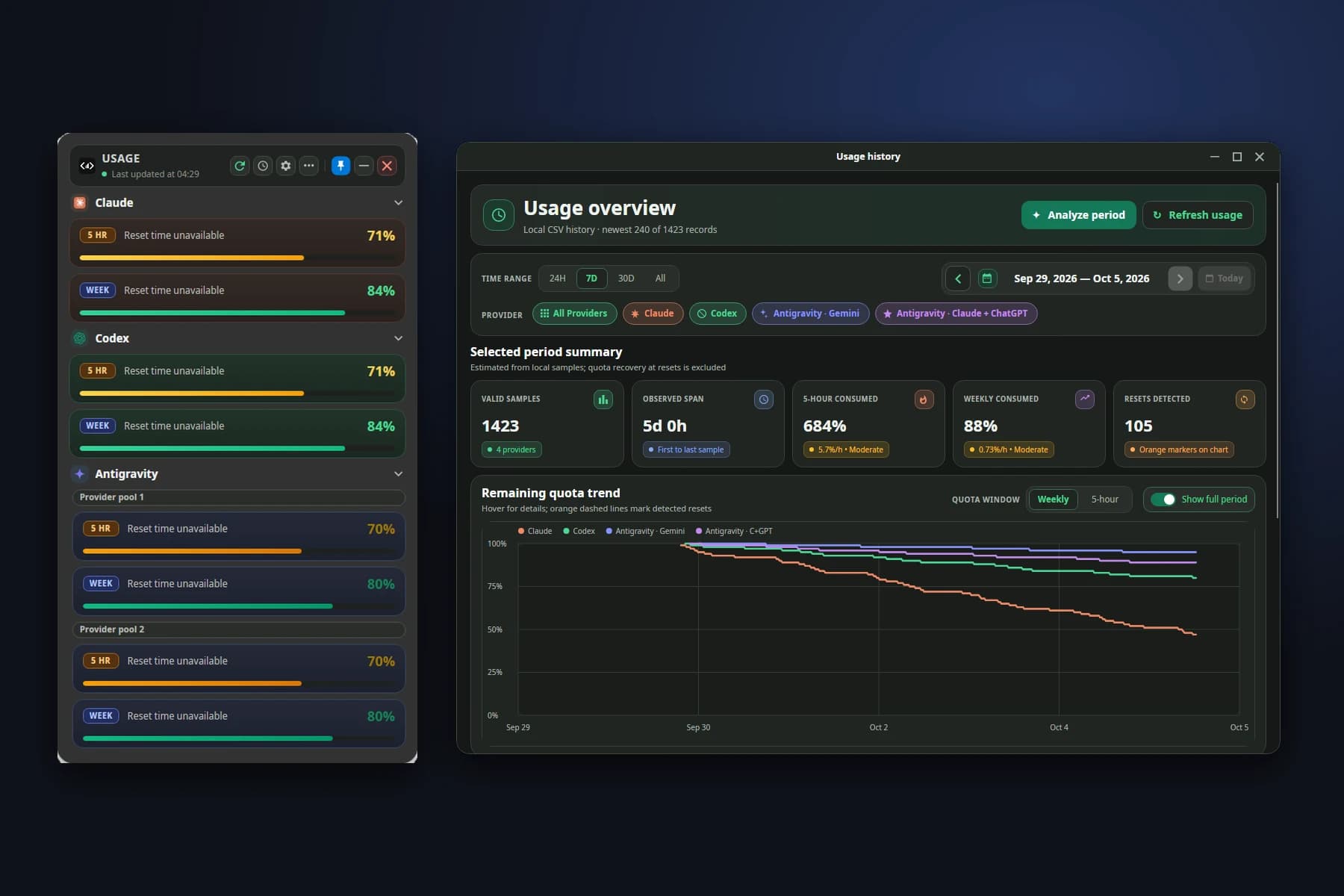
Claude Codex Usage Companion is an open-source app that shows the usage limits (the 5-hour and weekly windows) of Claude Code, Codex and Google Antigravity in one always-on-top panel on the Linux desktop, with a CLI and a tray icon. The original is gkfriend’s Windows (WPF) app, which ychsieh95 ported to Linux with Avalonia. I forked from version 0.1.2 and added Antigravity as a third provider, built a GNOME top-bar extension, a usage history and analysis suite, a light theme, a compact mode and more translations — my work lives on the feature/antigravity branch.
The problem
- 01AI coding tools have two overlapping limits (5-hour and weekly); if you don’t look, you only find out when you’ve run out.
- 02Each provider shows its quota in a different place and format, and Antigravity has no public API for it.
- 03The existing app showed the current state and could log it to a file, but had no history view, so it couldn’t say how fast you burn quota or whether a cycle was used well before it reset.
- 04Linux means several desktops and window systems (KDE/GNOME, X11/Wayland) that handle status bars and floating windows differently.
The approach
- 01Antigravity: find the running language-server process through /proc (the user’s own only), read its port and CSRF token, and call its local service over loopback for a quota summary — mapped to two shared pools (Gemini, and Claude + ChatGPT) without storing the token or sending anything off the machine.
- 02Interface: Claude → Codex → Antigravity cards with a countdown to the reset, compact mode, light/dark themes and a categorised settings window with search.
- 03A GNOME top-bar extension (GJS) that receives state from the app through a state bridge, with an install script that clears stale versions and JS tests.
- 04Usage history: reads the CSV the app logs (old and new schemas), draws the remaining-quota trend, offers 24H/7D/30D/All ranges and provider filters, and marks detected resets with orange dashed lines.
- 05Analysis: hourly burn rate, the 5-hour to weekly quota ratio, a runway status and a Reset efficiency window — counting only downward quota movement, never the recovery at a reset.
- 06The new screens translated into three languages (English, 繁體中文, 简体中文), plus desktop integration tests in CI (GNOME extension, Plasma widget, installer).
The result
- 01Three providers’ quotas, with history and analysis, in one app instead of several places.
- 02Test methods grew from 169 to 303, and CI runs Debug and Release with warnings treated as errors.
- 03The screens state their own limits, e.g. “estimated from local samples” and “activity between refreshes may not be captured”.
Deliverables
- Antigravity provider (process discovery, client, parser, runtime provider) with tests
- GNOME top-bar extension and its install script
- History, analysis, Reset efficiency and Timeline windows
- Light theme, compact mode and a redesigned settings window
- install-desktop.sh and desktop integration tests in CI
Gallery
Overlay (synthetic data)
16:9 / LG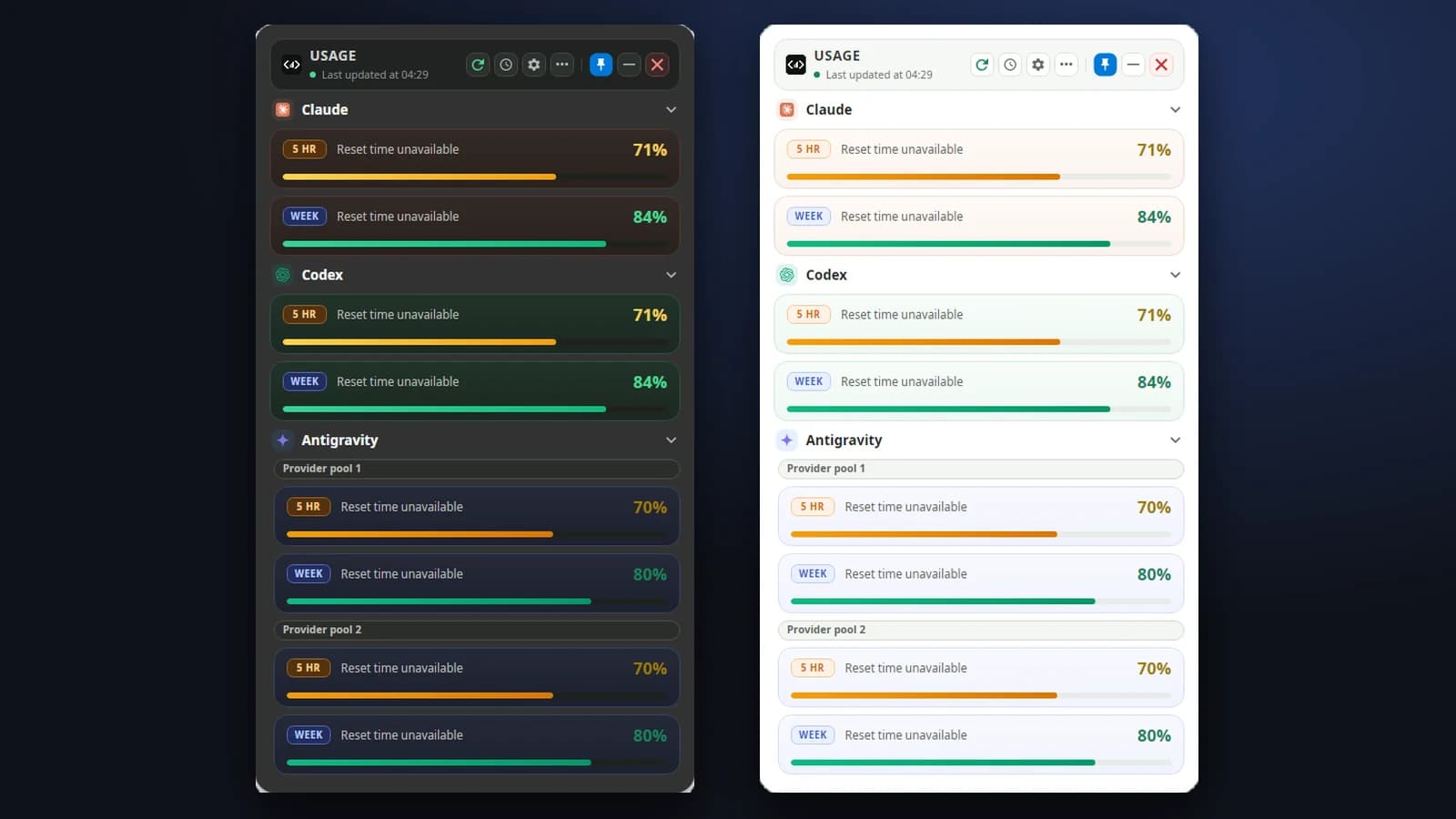
The overlay showing Claude, Codex and Antigravity (two pools) in the dark and light themes. Synthetic data, not a real account’s quota
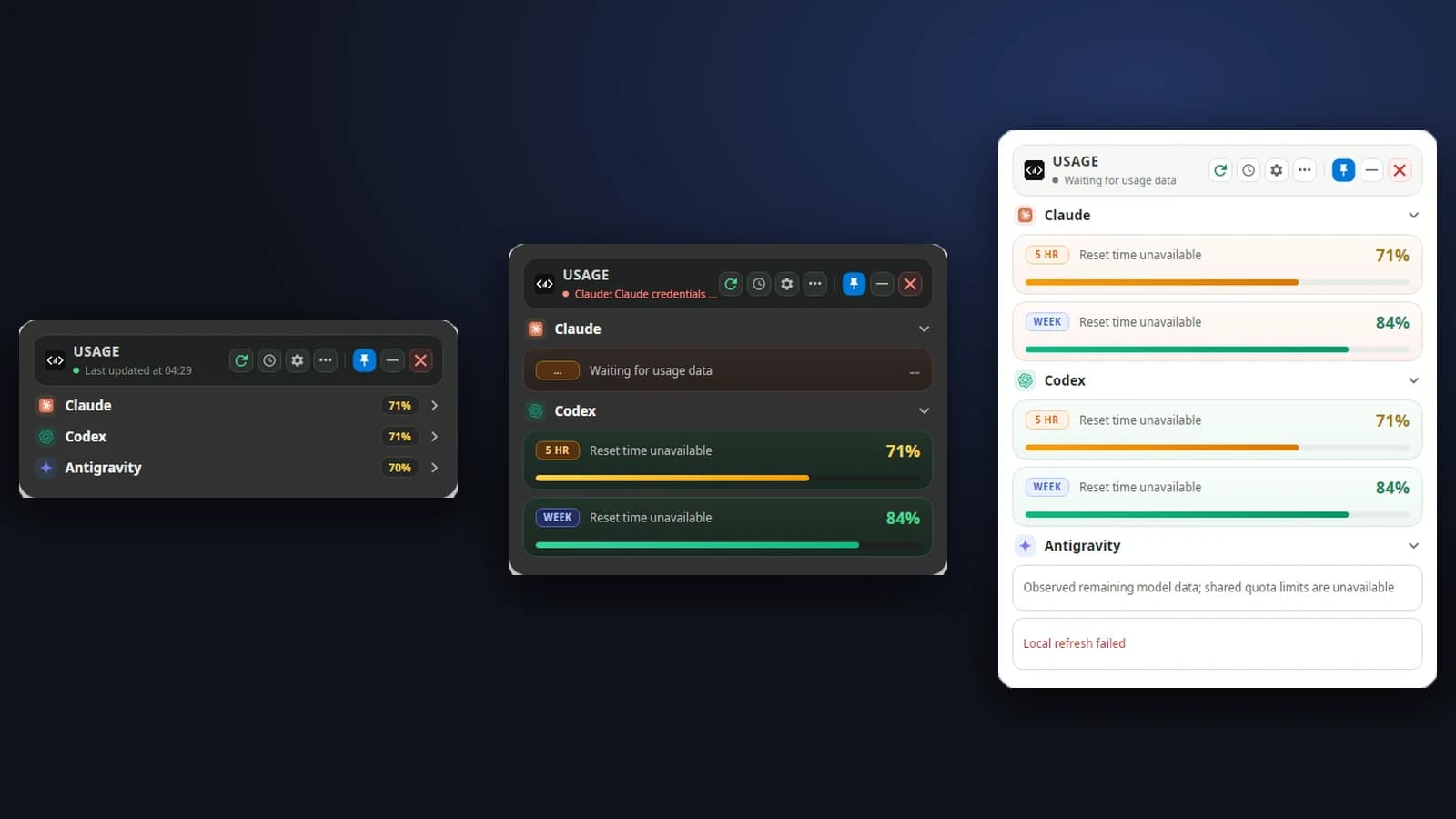
Compact mode, a provider that isn’t ready, and a failed refresh — each explains itself instead of guessing
Retrospective
Challenges
- Antigravity’s API is undocumented, so the parser, the client and the process discovery are kept separate, tested, and fall back to a clear message when the shared quota can’t be read.
- The tokens live on the user’s machine and must never be logged: debug text only says a token is “present”, and history records only the shared pools — no models, accounts or plans.
- I tried an X11 window hint to keep the panel on top under XWayland, found it hurt compatibility, and removed it.
- The GNOME extension needed several UUID and version bumps (v2–v4) and its install script had to deal with stale copies.
Learnings
- Extending someone else’s code means being clear about what is whose: a separate branch, and the original credits and licence left intact.
- Keep analytics honest — state the data’s limits on screen rather than claiming more than was measured.
- Checking UI layout with Avalonia.Headless and synthetic data gives repeatable screenshots without a real account.
Technologies
- C#
- .NET 10
- Avalonia
- xUnit
- GJS (GNOME Shell)
- Tmds.DBus
- GitHub Actions
- Bash
Interested in work like this?
Tell me about your brief — I reply within 24 hours.