Personal·2026·Web App · Education · Data Visualization
graph.phatphum.me — Visual Knowledge Atlas
One knowledge model, several ways to read it: a dependency graph, a roadmap, an outline and a focus view — with Frontend, Computer Networks and Cybersecurity curricula I wrote and validated myself
- Role
- Solo developer — data model, curriculum (content and research notes), front end, accessibility and testing
- Team
- Solo project
- Duration
- 4–6 Oct 2026
- Year
- 2026
Key figures
- 146
- maps in total (21 published + 125 coming soon)
- 699
- canonical topics
- 7,012
- semantic edges
- 404
- official resources
- 92
- unit tests passing (17 files)
graph.phatphum.me is a knowledge atlas built to show how things connect, instead of one long list of topics. A topic is one canonical piece of knowledge (a summary, why it matters, a difficulty) that can appear in many maps without duplicating its content or the reader’s progress. Learners choose a graph, a roadmap, an outline, or a Focus view that isolates what to know first and what a topic unlocks. The data is a curriculum I authored: 146 maps (21 published — Frontend, Computer Networks and Cybersecurity with their sub-maps), 699 topics and 404 official resources. A learner’s progress lives only in their browser; there are no accounts.
The problem
- 01A long list of topics can’t say what comes first, what is optional, or how one subject relates to another.
- 02A static diagram, or a graph alone, is hard to read on a phone and for keyboard and screen-reader users.
- 03The same topic (HTTP, or accessibility) appears in several curricula; copying it everywhere makes it hard to edit and leaves progress out of sync.
- 04A large hand-written curriculum is easy to get wrong: prerequisite cycles, edges that point across maps, or foundational topics silently dropped.
The approach
- 01A seven-model schema: Topic is the canonical knowledge and GraphNode is “an appearance of a topic in one map”, so both content and progress are shared across maps. GraphEdge uses composite foreign keys so an edge can’t end in a different map, and Resource links to topics through TopicResource.
- 02Five edge types drawn differently: PREREQUISITE (must form a DAG), RECOMMENDED, RELATED, ALTERNATIVE and UNLOCKS. Ancestor/descendant traversal, shortest paths and topological ordering use PREREQUISITE edges only.
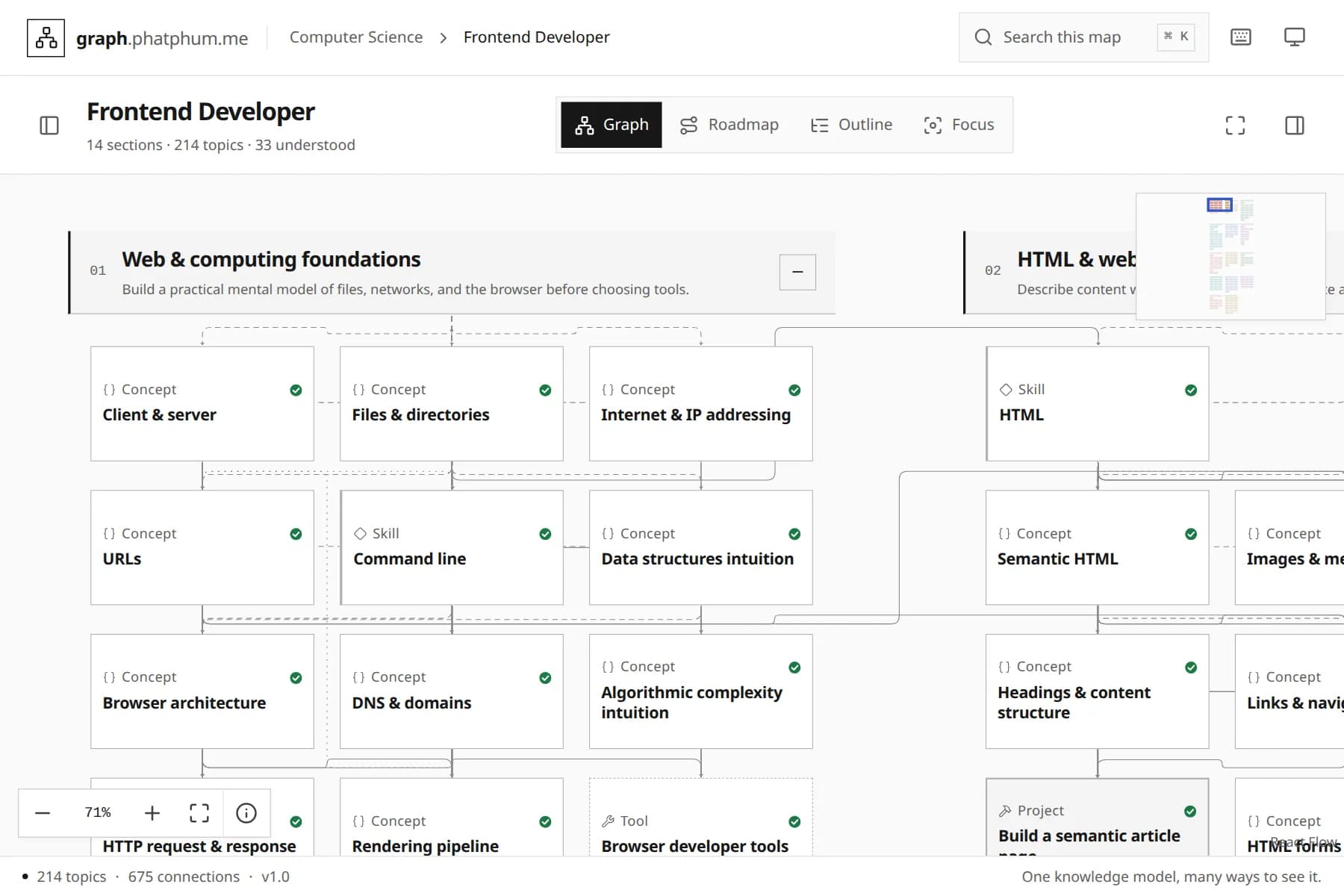
- 03Four views from the same data: Graph (React Flow with semantic-zoom nodes and a MiniMap), Roadmap (sections as milestones with progress bars and a “You are here” banner), Outline (an expandable list) and Focus (a dagre re-layout of just the related topics).
- 04Not started / Learning / Understood progress is stored in versioned localStorage keyed by canonical topic IDs, with Undo, an “I already know these” shortcut and whole-section updates. Nothing is sent to the server or put in a URL.
- 05Curricula I wrote: Frontend Developer (14 sections, with JavaScript, CSS and React sub-maps), Computer Networks (26 sections, 215 topics, 15 projects, 7 sub-maps) and Cybersecurity Foundations (28 sections, 229 topics, 25 projects, 8 sub-maps, using OWASP Top 10:2025 as the awareness baseline), with research notes and reference lists in prisma/seeds.
- 06The Computer Science catalogue carries 125 unpublished maps explicitly marked COMING_SOON, with no fake nodes or links, and a generic domain page so a new domain is just seed data.
- 07Seeding runs in one transaction with stable IDs and validates before writing (cycles, missing endpoints, duplicate slugs and paths, dangling resources); a db:validate command re-checks the live database.
- 08The phone layout (below 768px) is redesigned: it starts on Outline, the graph becomes a one-section-at-a-time list of levels, and the Inspector and Focus panels are bottom sheets, with only one drawer open at a time on narrow screens.
The result
- 01One site where the same map opens in four ways, and the learner always sees where they are and what to do next — without an account.
- 0292 unit tests in 17 files pass, covering graph algorithms, layout, roadmap, seed validation, progress, markdown, real SQLite constraints and CSS rules (no !important, no hex colours outside the tokens).
- 03Playwright end-to-end tests (desktop and mobile) with axe-core scans of every page in light and dark, and checks for minimum text size, tap-target size and layout shift.
- 04Accessibility throughout: keyboard coverage of the map (a single tab stop), reduced motion, forced-colors and high-contrast support.
Deliverables
- A Next.js 16 + React 19 site with four views (Graph, Roadmap, Outline, Focus) and a Topic Inspector
- A Prisma 7 + SQLite data model (7 models) with migrations, idempotent seeding and a db:validate checker
- The Frontend, Computer Networks and Cybersecurity curricula with research notes and reference lists
- A theming system built from design tokens (light, dark and high-contrast) and hand-written CSS with no framework
- Vitest and Playwright + axe-core test suites
Gallery
From the home page to a knowledge map
16:9 / LG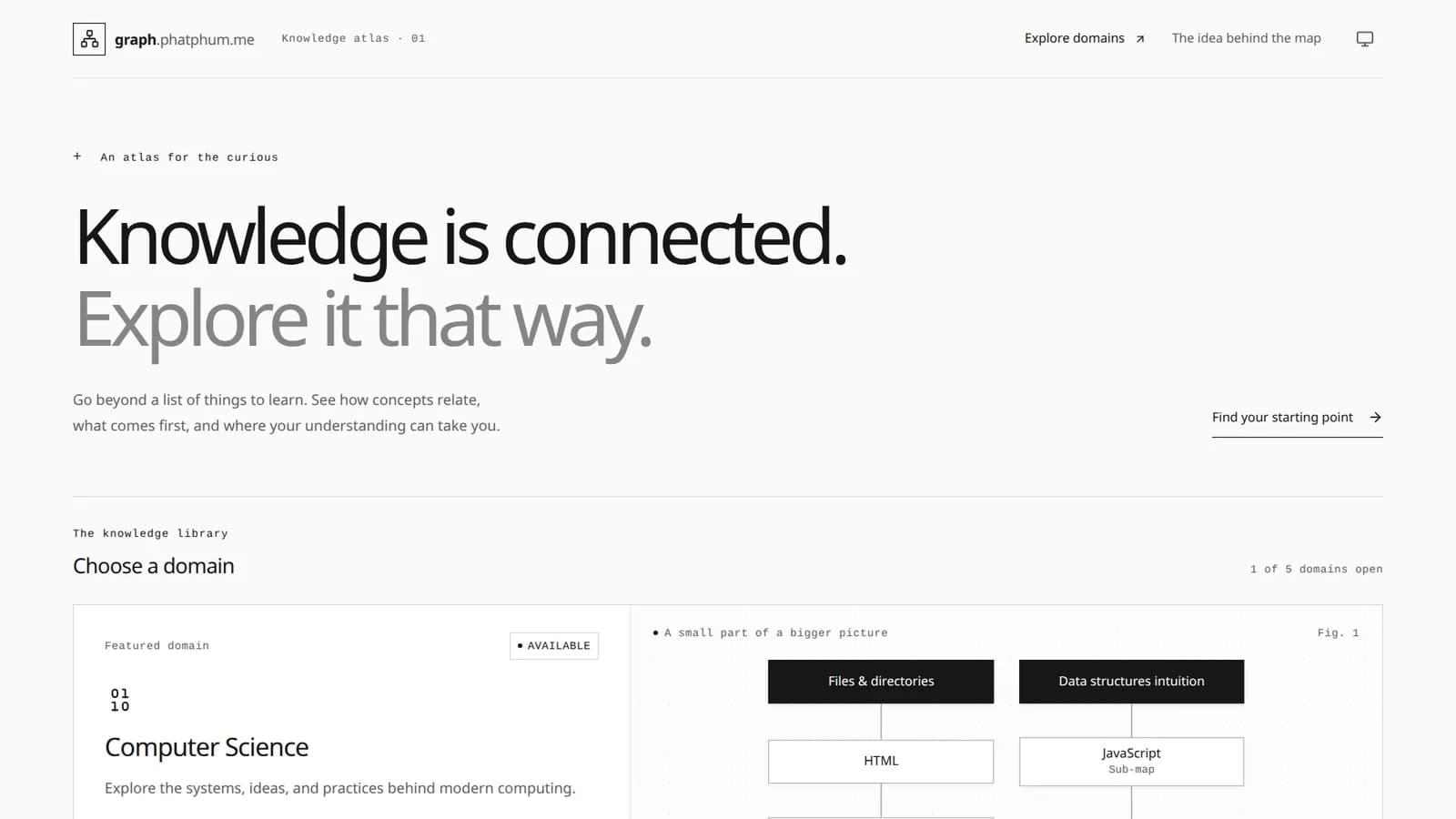
The home page, “Knowledge is connected.” Choose a domain (1 of 5 is open) next to a graph preview built from the real database, not a static picture
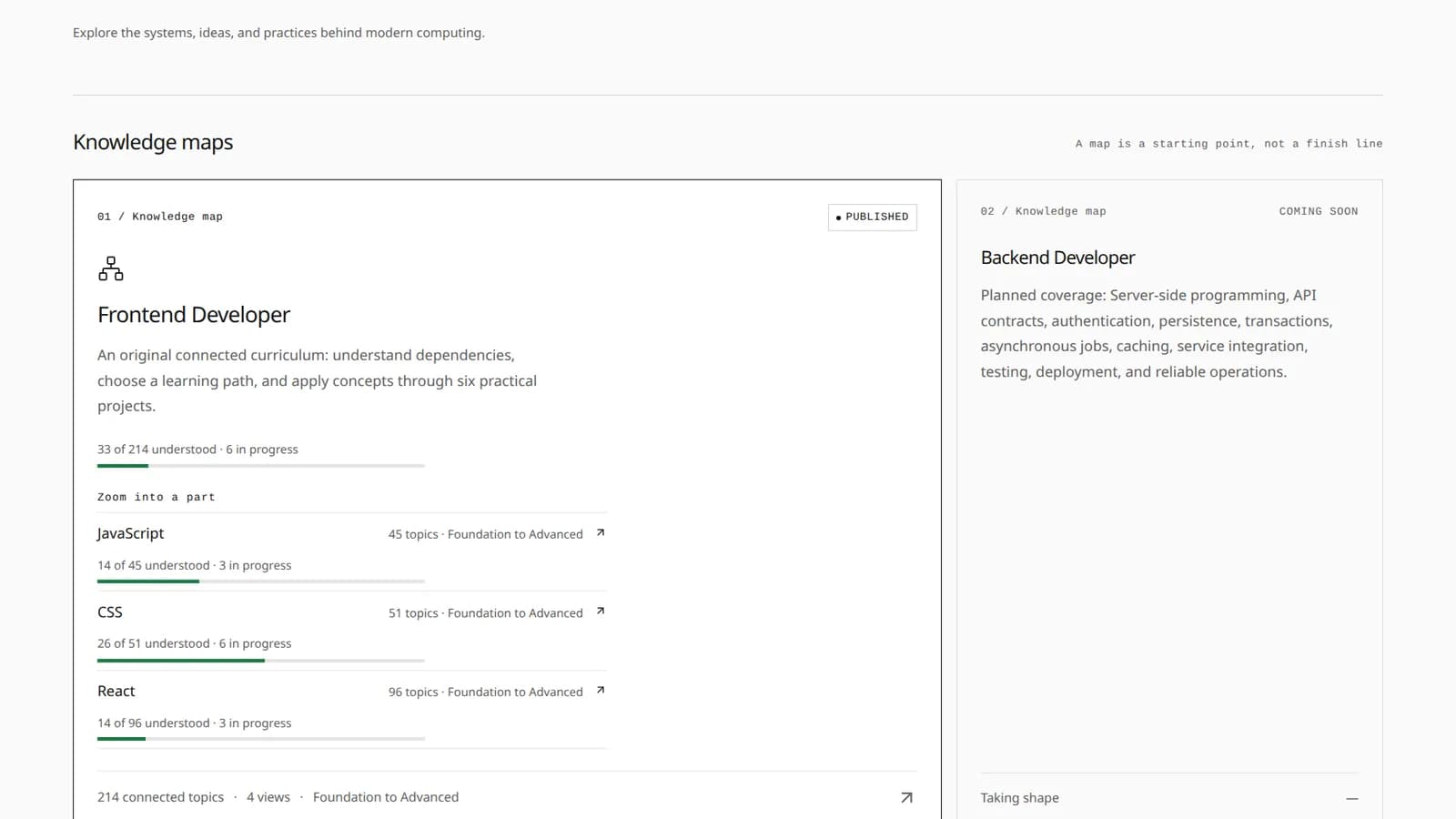
The Computer Science domain: a published map shows progress and its sub-maps (JavaScript, CSS, React), while unfinished maps are honestly marked Coming soon
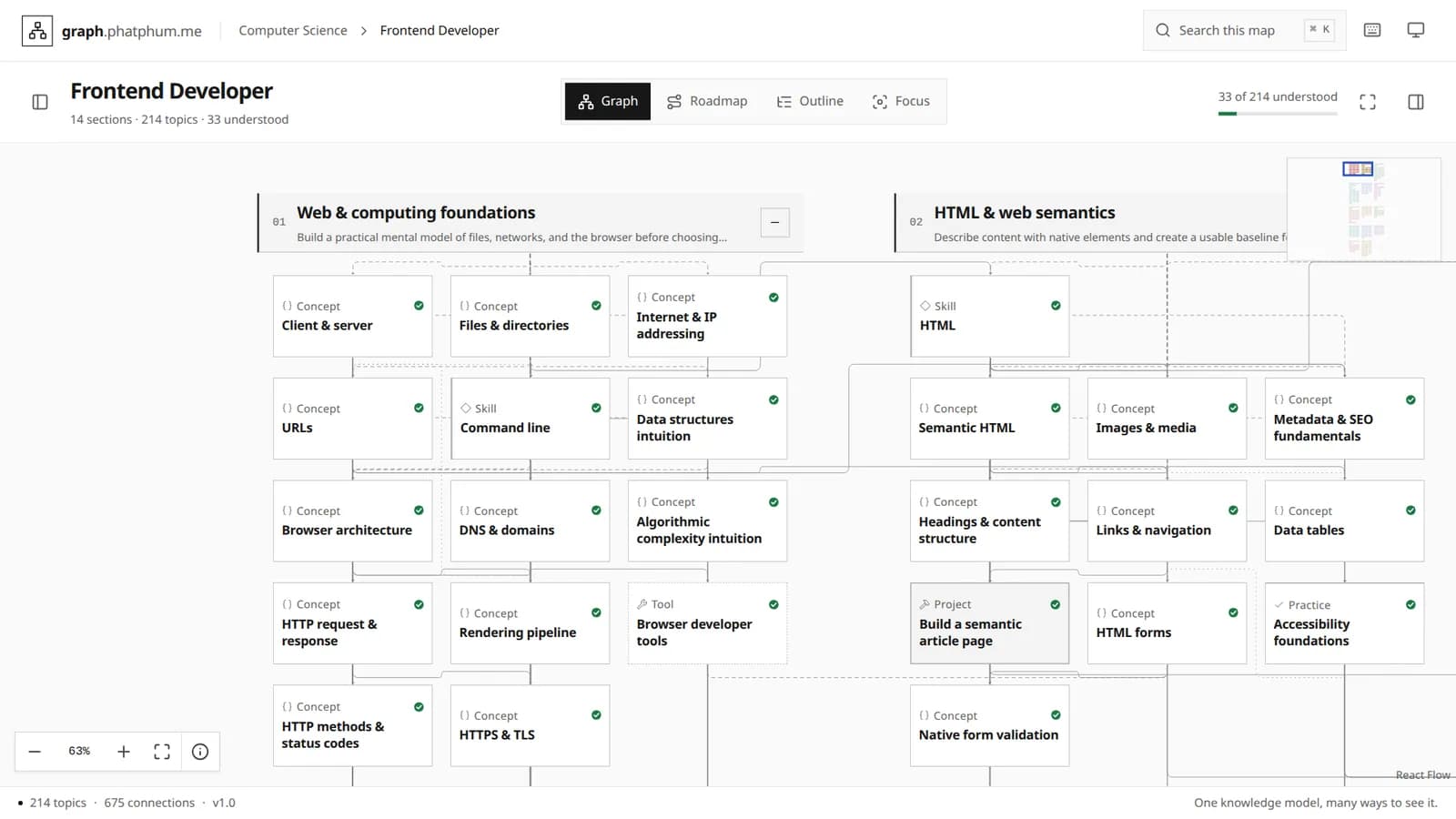
The Graph view of Frontend Developer: topic cards grouped by section, edges drawn by relation type, and ticks for what you already understand (stored in the browser)
Retrospective
Challenges
- Keeping the graph legible at every zoom: semantic-zoom nodes (summaries from 80% zoom, text never below 12px), dagre-laid-out section clusters, and a Focus view that keeps only what is related instead of drawing the whole map on top of itself.
- A topic lives in several maps, but a sub-map must include its prerequisite ancestors rather than silently dropping the basics, so cycle and endpoint checks run both at seed time and against the database.
- Prisma 7 with SQLite through an adapter (better-sqlite3): the CLI, client and adapter must be pinned together (7.10.0), and the database path has to resolve the same for the CLI and at runtime.
- Each theme needs enough contrast (edges at 3:1 or better) with no hard-coded colour in components, so a test fails the build on a hex colour, an !important, or an undefined token.
Learnings
- Separating “knowledge” from “appearance in a map” lets me add a map without copying content, and progress follows the learner across maps.
- Running hand-written data through automatic checks (cycles, references, duplicates) before it reaches the database lets the curriculum grow without fear of breaking it.
- Automated accessibility scans (axe-core) next to measurable rules (text size, tap targets) catch problems faster than checking by eye.
Technologies
Interested in work like this?
Tell me about your brief — I reply within 24 hours.